DECION JOURNAL / THE PRACTICAL GUIDE
How to use Decion: a practical guide to everyday decisions
Turn the question on your mind into a clearer next step. Real app screens, everyday scenarios and a template for your first decision.
01 / A clearer starting point
How to use Decion in five practical steps
You have two job offers, a project that keeps slipping, or a price increase you keep postponing. More tabs are open. The decision is not getting any clearer. Decion is an AI decision-making app for iPhone and iPad that helps you compare options, look at the trade-offs from different perspectives, and identify a next step.
The useful starting point is one real question. You do not need a perfect brief. You need enough context to make the trade-offs visible.
Name the choice you need to make.
Open a new decision and describe your options. “Should I hire or outsource?” is a start. “Should I hire a part-time designer or use a freelancer for a three-month launch?” gives the analysis something concrete to work with.
Add the facts that could change the answer.
Include your goal, budget, deadline, constraints and what you already know. Separate estimates from facts. Explain what success looks like and which downside you cannot accept.
Choose relevant perspectives.
Build a council around the decision. A Strategist can examine long-term fit; a Financial Analyst can focus on the numbers; a Risk Officer can challenge the downside. Pick perspectives that add different questions, rather than asking the same question several ways. Availability depends on your plan.
Read the direction, then the reasoning.
Start with the recommended direction, the risk to consider and the next step. Open the detailed report when you need the reasoning behind the summary. A useful answer can also be “gather more information”: uncertainty is part of the decision.
Turn the analysis into one action.
Choose the smallest useful next move: request a quote, test a price, ask a missing question, or set a review date. Check important facts before making a commitment. You stay in charge of the decision.
02 / Inside the app
From a question to a decision you can examine
These actual iPhone captures show the input, overview and detailed report. In this hiring example, the analysis asks for missing information before recommending a commitment. That is useful progress: you now know what to find out.
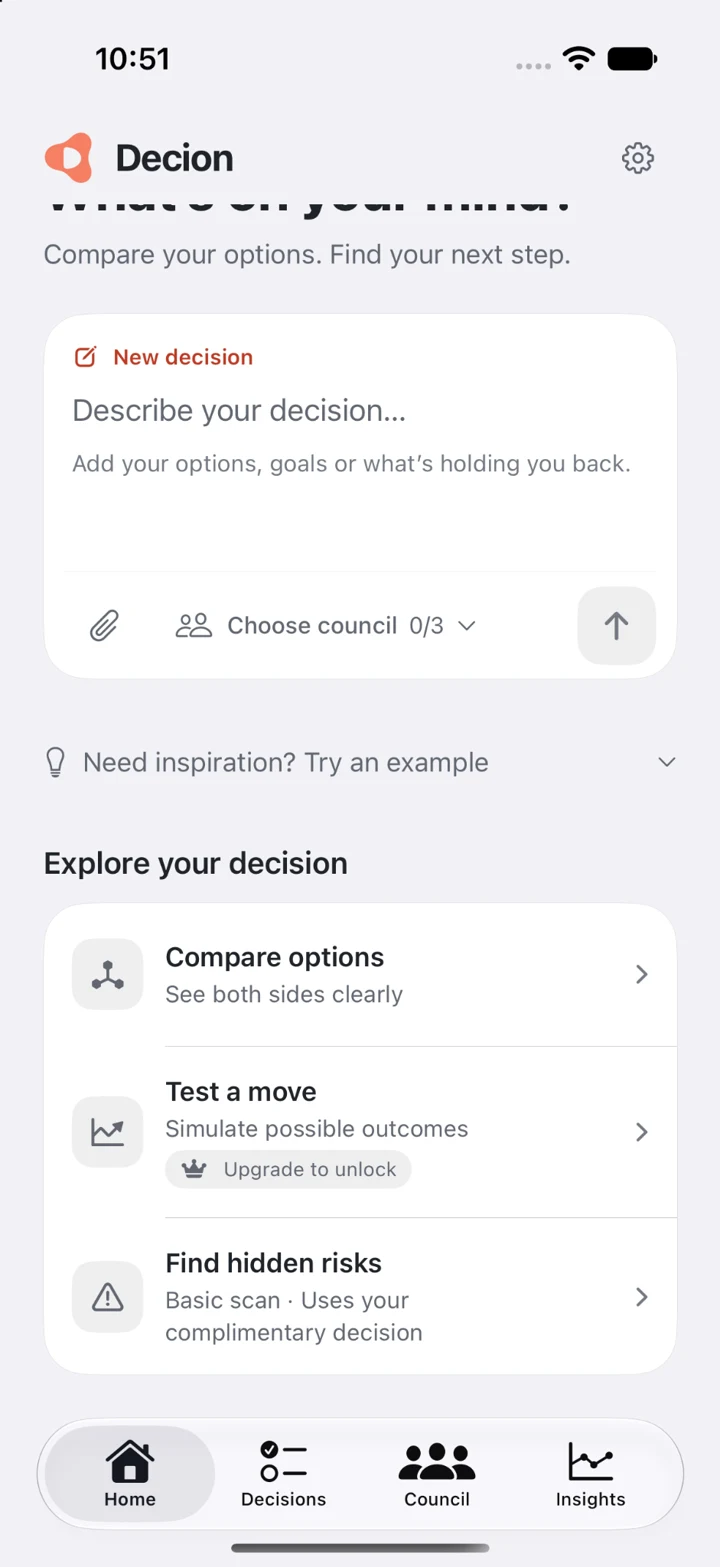
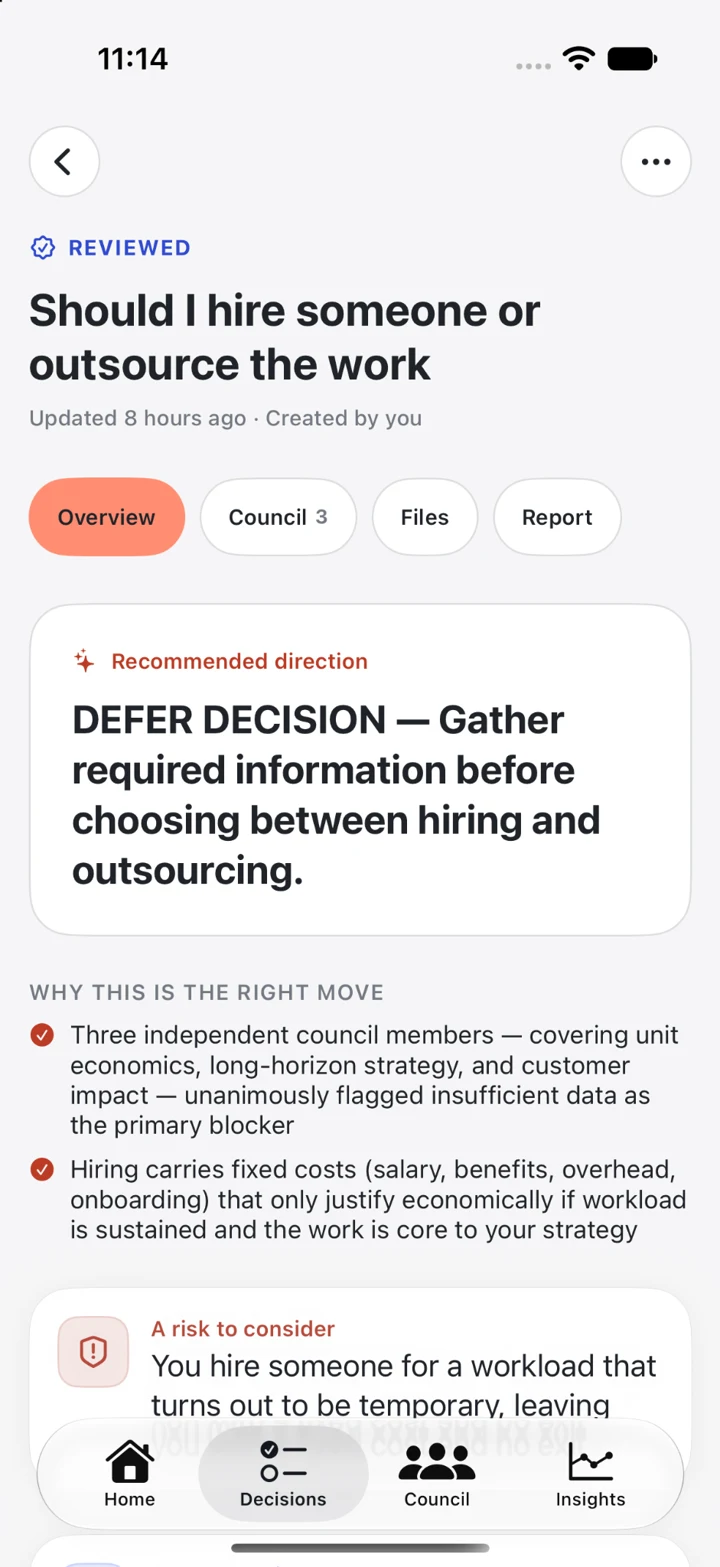
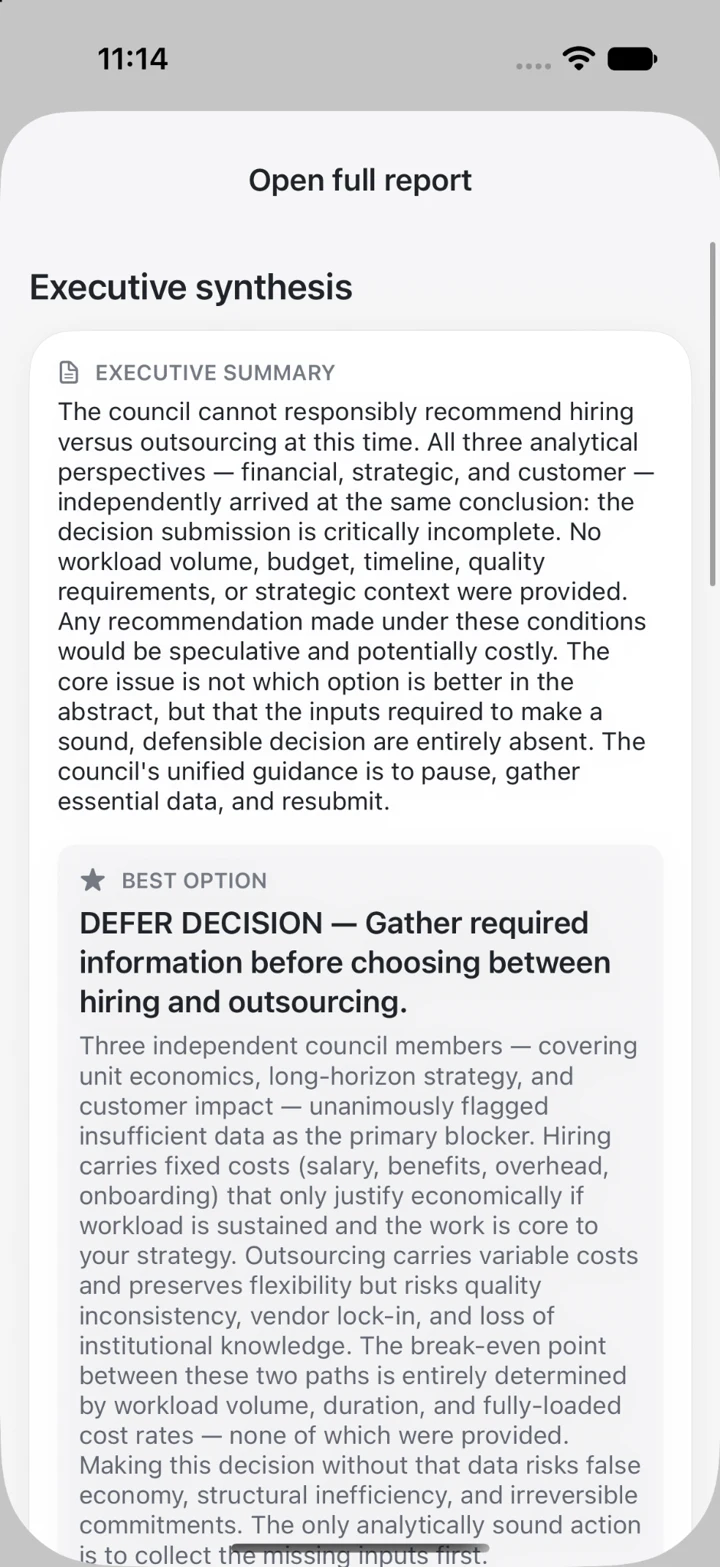
Actual app captures from September 24, 2026, before the blue interface update. Colours, labels and plan limits shown may differ from the current version. Tap a screen to enlarge it. The scenarios below are illustrative prompts, not measured customer results.
03 / Make it yours
Six everyday decisions to bring to Decion
Choose between two job offers
One pays more. The other gives you time back. Put salary, commute, growth, stability and family priorities into the same brief. Ask which missing detail could change your choice.
“Offer A pays more but adds a daily commute. Offer B is remote with a smaller team. I value learning and time with family. Compare the trade-offs and the questions I should ask before accepting.”
Next move: clarify one unresolved point with each employer.
Raise your prices with a test in mind
Instead of looping on “Will clients leave?”, describe capacity, costs and the kind of client you want. Compare a broad increase with a smaller test for new proposals.
“I am near capacity and considering a 15% price increase. Compare raising all rates with testing the new rate on new clients. What assumptions and risks should I check?”
Next move: define a small test and what would count as success.
Decide whether to hire or outsource
Make the workload visible. Include duration, expected demand, supervision and budget. A good comparison considers commitment and handover costs as well as the headline price.
“We need design support for a three-month launch. Compare a part-time hire with a freelancer. What workload and cost information do I need before deciding?”
Next move: collect comparable quotes and estimate management time.
Start, narrow or pause a side project
An idea can be attractive and still be too large for the time available. Compare the full plan with a smaller experiment, using your actual weekly capacity.
“I have five hours a week for a new project. Compare launching the full idea with testing one feature first. What is the smallest useful experiment?”
Next move: define one test you can finish before expanding the scope.
Buy now, repair or wait
Bring the real alternatives to a purchase decision. Consider how often you use the item, repair costs, budget and the inconvenience of waiting—not just the appealing new features.
“My laptop is slowing down. Compare repairing it, buying a replacement and waiting three months. I use it for work and want to avoid unnecessary spending.”
Next move: get a repair estimate and verify the replacement cost.
Think through a move
Compare rent, commute, support network and daily routine. Name the things you do not want to lose. The goal is a clearer set of trade-offs, not a universal “best city.”
“Compare staying where I live with moving closer to work. My priorities are monthly costs, time and being near friends. What information is missing?”
Next move: test the commute and build a realistic monthly budget.
04 / A better brief
A simple decision prompt you can reuse
Replace the brackets with your situation. A short, specific brief helps the analysis stay close to your life. You can use the same structure for a work question or a personal choice.
I need to decide whether to [option A] or [option B].
My goal is [the outcome that matters].
My constraints are [budget, time, responsibilities].
What I know: [facts].
What I am unsure about: [estimates or missing information].
The downside I want to avoid is [main concern].
Compare the trade-offs, challenge my assumptions and suggest a practical next step. Tell me what information could change the recommendation.
Try this: if your brief only describes your preferred option, add the strongest reason to choose the alternative. You will get a more useful question to examine.
05 / Less back-and-forth
Where a decision-making app can save effort
The time benefit is in structuring the work. Rather than rebuilding your pros-and-cons list in several places, you start with one question, examine different perspectives and focus on what to do next. You can move from “I should think about this” to “I need these two facts before I decide.”
When you feel stuck
Keep reopening the same tabs.
Compare options using different criteria.
Confuse a missing fact with an impossible choice.
A more useful routine
Write one brief with shared criteria.
Read the recommendation and its caveats together.
Leave with a question to answer or an action to take.
There is no fixed time-saving promise. Complex decisions still need research, discussion and judgment. Decion helps organise that thinking; it does not remove the need to verify important information.
06 / Before your first decision
Questions about using Decion
Is Decion only for business decisions?
No. You can describe work, project and everyday choices in your own words. The useful pattern is the same: options, context, constraints and a next step.
Does Decion make the decision for me?
No. It provides AI-generated analysis to help you examine a decision. Review its assumptions and check important facts. Use qualified professional advice where your situation requires it.
Can I try Decion before choosing a plan?
Start with the complimentary decision offered in the app. Professional and Executive add capacity and features. Check the current offer, eligibility and subscription terms in the app and App Store before confirming a purchase.
What should I include in my first prompt?
Your options, goal, constraints, relevant facts and uncertainties. Avoid unnecessary personal or confidential information. Read the AI analysis consent screen and privacy policy before submitting your context or attachments.
Which languages does the app support?
Turkish, English, German, French, Italian, Spanish, Portuguese, Arabic, Chinese, Japanese and Hebrew. This guide is available in English and Turkish; app screens shown here are in English.
YOUR NEXT DECISION
Start with the question you keep coming back to.
Write down two options, what matters to you and your biggest uncertainty. Your first decision does not need to be perfectly framed. It just needs to be real.
Download Decion on the App Store ↗iPhone & iPad · Offers in-app purchases.